Shapes Demo Guide
The Astute Shapes Demo is a Qt6-based graphical application for testing DDS interoperability. It's the standard tool used by DDS vendors to demonstrate cross-vendor compatibility.
What is the Shapes Demo?
The Shapes Demo publishes and subscribes to geometric shapes (circles, squares, triangles) with different colors on a shared canvas. Each shape's position is updated in real-time over DDS, allowing multiple applications from different vendors to see the same shapes moving.
Install the Astute Shapes Demo
Use the package format for your operating system.
Windows (MSI)
msiexec /i astutedds-shapes-demo-<version>-windows-x64.msi
astutedds-shapes-demo.exe
RHEL / Rocky / AlmaLinux (RPM)
sudo dnf install ./astutedds-shapes-demo-<version>-x86_64.rpm
astute-shapes-demo
Debian / Ubuntu (DEB)
sudo dpkg -i astutedds-shapes-demo_<version>_amd64.deb
sudo apt-get install -f
astute-shapes-demo
Running the Shapes Demo
Starting the Application
astute-shapes-demoThe application window displays:
- Canvas: 240x270 coordinate space showing shapes
- Shape Controls: Select shape type (Circle, Square, Triangle)
- Color Selector: Choose from standard colors (RED, GREEN, BLUE, etc.)
- Publish Button: Start publishing a shape
- Subscribe Button: Subscribe to shapes from other applications
- QoS Settings: Configure Quality of Service policies
Publishing Shapes
To publish a shape:
- Select Shape Type: Choose Circle, Square, or Triangle
- Choose Color: Select a color (e.g., BLUE)
- Set Size: Adjust shape size (10-100 pixels)
- Enable Auto-move: Check to animate the shape
- Click Publish: Shape appears and starts moving
Publish Options Window
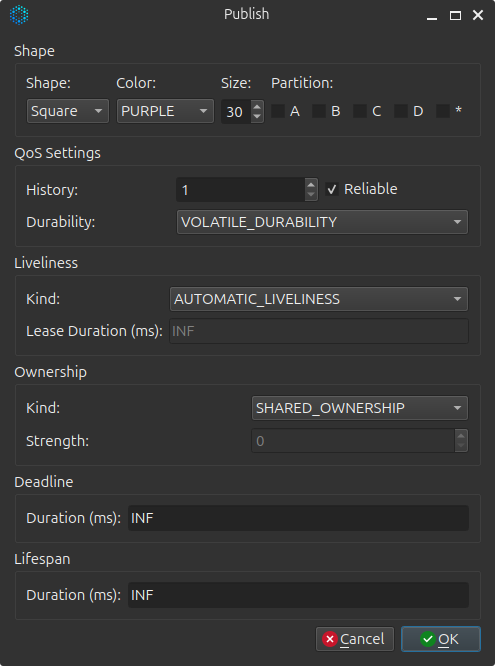
The publish options window allows you to configure:
- Shape type: Circle, Square, or Triangle
- Color: Select from standard DDS colors
- Size: Shape size in pixels (10-100)
- Auto-move: Enable automatic shape animation
- QoS Settings: Reliability, Durability, History depth, Ownership
Publishing Live Window
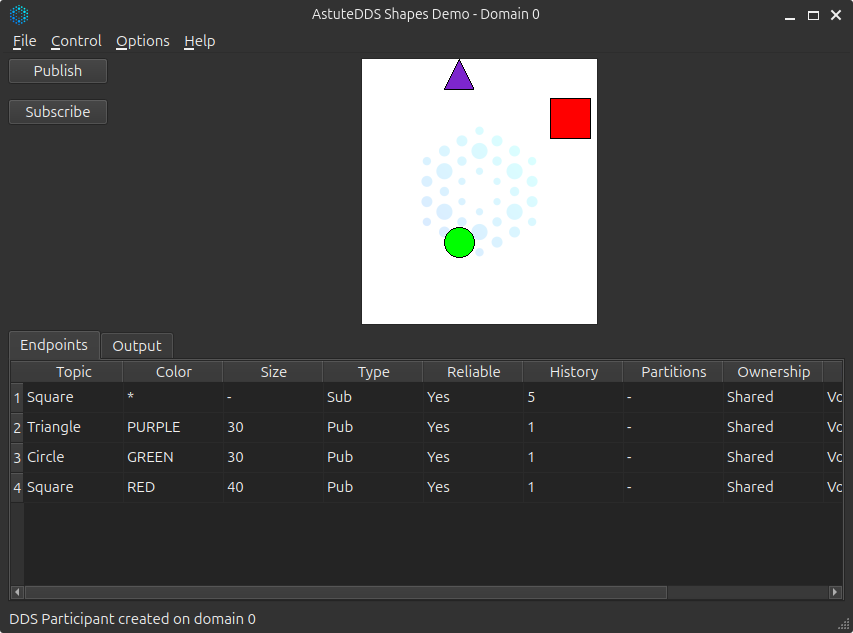
Once published, you'll see:
- Your shape moving on the canvas
- Real-time position updates
- Active publishers listed in the status area
Publishing Example Workflow
Standard Colors
The Shapes Demo uses standard DDS colors:
- RED
- GREEN
- BLUE
- YELLOW
- CYAN
- MAGENTA
- ORANGE
- PURPLE
Subscribing to Shapes
To subscribe to shapes:
- Select Color: Choose which color to subscribe to (e.g., BLUE)
- Click Subscribe: Create a DataReader for that color
- View Shapes: Shapes published by any DDS application appear on the canvas
Subscribe Options Window
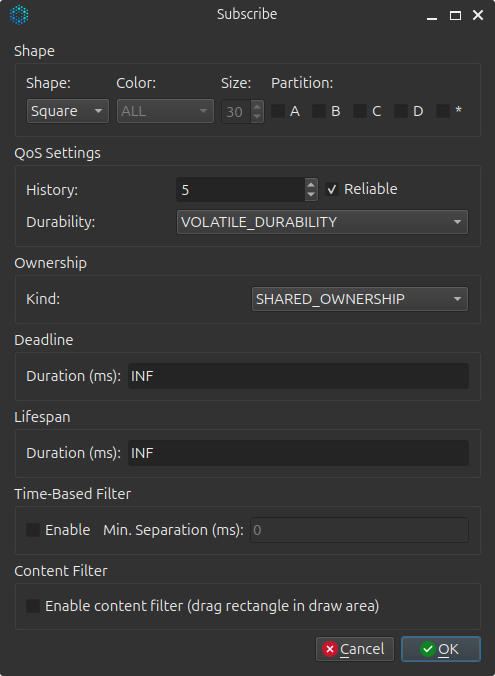
The subscribe options window allows you to configure:
- Color: Select which color to subscribe to
- QoS Settings: Match publisher's QoS for successful communication
- History: Control how many historical samples to receive
Subscription Example Workflow
Standard Topics
The Shapes Demo uses three standard DDS topics:
| Topic Name | Data Type | Description |
|---|---|---|
Circle |
ShapeType |
Circular shapes |
Square |
ShapeType |
Square shapes |
Triangle |
ShapeType |
Triangular shapes |
ShapeType IDL Definition
All topics use the same data type:
module ShapesDemo {
    @mutable
    struct ShapeType {
        @key string<128> color;
        long x;
        long y;
        long shapesize;
    };
};
Generated C++ structure:
namespace ShapesDemo {
    struct ShapeType {
        std::string color;  // Key field
        int32_t x;
        int32_t y;
        int32_t shapesize;
    };
}
Coordinate System
The Shapes Demo uses a standard coordinate system:
- X axis: 0 to 240 (left to right)
- Y axis: 0 to 270 (top to bottom)
- Origin: Top-left corner
- Bounds: Shapes bounce off edges
(0,0) ----------------------- (240,0)
  |                              |
  |        Canvas Area           |
  |                              |
  |                              |
(0,270) --------------------- (240,270)
Testing Interoperability
The Astute Shapes Demo is compatible with shapes demos from other DDS vendors:
- eProsima Fast DDS Shapes Demo
- RTI Shapes Demo
- OpenDDS Shapes Demo
- CycloneDDS Shapes Demo
- S2E Systems Shapes Demo
Interoperability Test Steps
- Start Astute Shapes Demo:
astute-shapes-demo- Start another vendor's Shapes Demo (e.g., eProsima Fast DDS):
./ShapesDemo # from Fast DDS installation- Publish from Astute Shapes Demo:
- Select "Circle" and "BLUE"
- Click "Publish"
-
Enable "Auto-move"
-
Subscribe from other vendor:
- Select "BLUE"
- Click "Subscribe"
-
The blue circle should appear and move
-
Verify bidirectional communication:
- Publish from the other vendor's demo
- Subscribe in AstuteDDS
- Shapes should appear in both applications
Expected Behavior
Endpoints Tab
The Endpoints tab in the main window lists all active publishers and subscribers, including the resolved data type name for each endpoint.
Type Schema Tooltip
Hovering over the Data Type cell in the endpoint table displays a tooltip showing the resolved struct fields and the XTypes equivalence hash for that type:
struct ShapeType {
  string<128> color    [key]
  int32 x
  int32 y
  int32 shapesize
}

Hash: 1a2b3c4d...
This is useful for confirming that remote participants are using the expected type definition and for quickly checking the XTypes hash without opening a separate inspector tool.
Value to developers
- Immediately see whether a discovered endpoint uses the expected struct layout
- Verify XTypes hash consistency across mixed-vendor deployments
- No separate tool needed to inspect the advertised data type
Quality of Service (QoS) Configuration
The Shapes Demo supports various QoS configurations:
Default QoS Settings
// Default configuration used by Shapes Demo
auto qos = astutedds::dcps::DataWriterQosBuilder()
    .reliability(astutedds::dcps::ReliabilityQosPolicyKind::RELIABLE_RELIABILITY_QOS)
    .durability(astutedds::dcps::DurabilityQosPolicyKind::VOLATILE_DURABILITY_QOS)
    .history(astutedds::dcps::HistoryQosPolicyKind::KEEP_LAST_HISTORY_QOS, 10)
    .build();
Reliability Options
RELIABLE (default):
- Guarantees delivery of all samples
- Uses HEARTBEAT/ACKNACK protocol
- Good for shape position updates
BEST_EFFORT:
- No delivery guarantees
- Lower latency
- Suitable for high-frequency sensor data
Durability Options
VOLATILE (default):
- No historical data
- Late joiners only see new updates
TRANSIENT_LOCAL:
- Late joiners receive last sample per instance
- Useful for state synchronization
History Settings
KEEP_LAST(10) (default):
- Maintains last 10 samples per shape
- Prevents unbounded memory growth
KEEP_ALL:
- Keeps all samples (up to resource limits)
- Higher memory usage
Common Use Cases
Use Case 1: Basic Connectivity Test
Goal: Verify DDS connectivity between two applications.
- Start Astute Shapes Demo
- Publish a BLUE Circle
- Subscribe to BLUE in the same application
- You should see the circle (loopback test)
Use Case 2: Cross-Vendor Interoperability
Goal: Test interoperability with another DDS implementation.
- Start Astute Shapes Demo
- Start Fast DDS Shapes Demo
- Publish RED Square in AstuteDDS
- Subscribe to RED in Fast DDS
- Verify shape appears in both applications
Use Case 3: QoS Compatibility Testing
Goal: Test QoS policy matching.
- Configure RELIABLE in AstuteDDS
- Configure BEST_EFFORT in Fast DDS
- Attempt to communicate
- Observe that endpoints don't match (incompatible QoS)
Use Case 4: Multiple Instances
Goal: Test multiple instances with different keys.
- Publish BLUE Circle
- Publish GREEN Circle
- Publish RED Circle
- All circles should appear simultaneously
- Each is a separate instance (different key = color)
Troubleshooting
Shapes Not Appearing
Problem: Published shapes don't appear in subscribing application.
Solutions:
- Check network connectivity (ping test)
- Verify same DDS domain ID (default: 0)
- Check firewall settings (allow UDP multicast)
- Ensure QoS policies are compatible
- Verify topic names match exactly
Discovery Issues
Problem: Applications don't discover each other.
Solutions:
- Check multicast support on network
- Verify UDP ports are open (7400, 7401, etc.)
- Check participant announcements in logs
- Try running on localhost first
Performance Problems
Problem: Shapes are choppy or slow.
Solutions:
- Reduce publish rate
- Use BEST_EFFORT reliability for smoother motion
- Increase history depth
- Check CPU and network utilization
Advanced Topics
Custom Shape Behaviors
Modify the shapes demo source to:
- Add custom shape types
- Implement collision detection
- Create pattern generators
- Add physics simulation
Programmatic Control
Create automated test scripts:
// Example: Automated shapes test
#include "ShapeType_TypeSupport.hpp"

int main() {
    auto participant = create_participant(0);
    auto topic = participant->create_topic<ShapesDemo::ShapeType>("Circle");
    auto writer = create_datawriter(participant, topic);

    ShapesDemo::ShapeType shape;
    shape.color = "BLUE";
    shape.shapesize = 30;

    // Publish shapes in a pattern
    for (int i = 0; i < 100; ++i) {
        shape.x = 120 + 100 * std::cos(i * 0.1);
        shape.y = 135 + 100 * std::sin(i * 0.1);
        writer->write(shape);
        std::this_thread::sleep_for(std::chrono::milliseconds(33));
    }

    return 0;
}
Next Steps
- Learn about QoS Policies in detail
- Explore the IDL Compiler to create custom types
- Build a custom publisher/subscriber
- Review QoS examples