Introducing GVA Designer
Today, for the first time, we are showing GVA Designer: a visual tool that takes a vehicle application from a sketch on a canvas to a running, registered GVA application, and lets you iterate and deploy updates onto vehicles in record time. It is the newest member of the ATLAS family, and it is built to put application development in the hands of application developers and SMEs.
Military systems no longer need to be bespoke and exotic
For a long time, military vehicle systems have been bespoke, exotic and closed. Every crew display, every integration and every change meant specialist knowledge, long lead times and a dependency on the one supplier who understood the box. That model is slow, expensive, and a poor fit for a world where requirements change faster than a procurement cycle.
We have been building the answer from the ground up. AstuteDDS gives vehicles a fast, standards-based data bus. The ATLAS digital crew suite builds on it with the registry, alarms, health and fault monitoring, and the GVA HMI. These are the solid foundations. GVA Designer is the next step: it extends that open architecture outward to application developers and SMEs, so that anyone who can design a screen can put an application on a vehicle.
An agile workflow, from canvas to vehicle
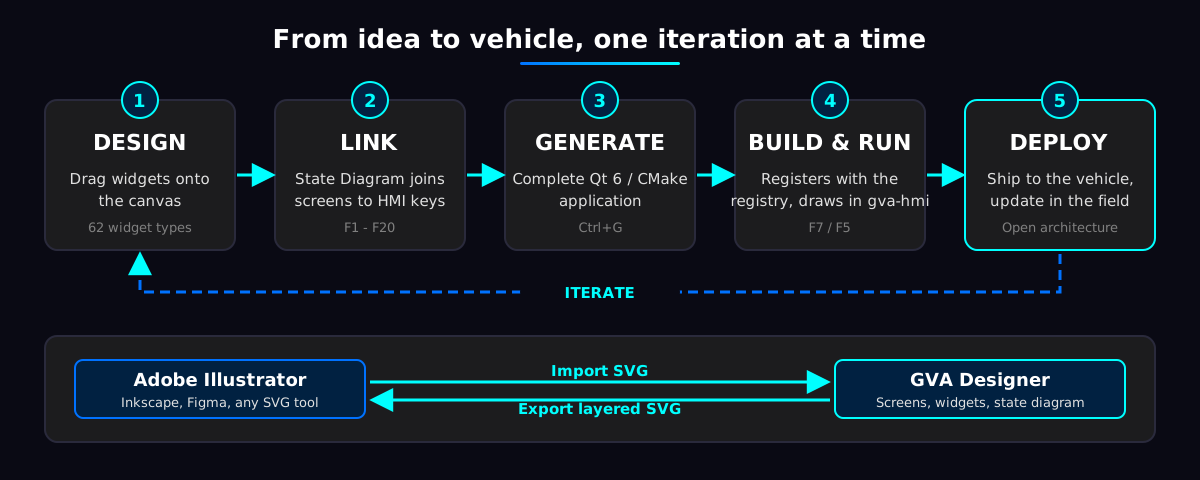
- Design. Drag widgets from the palette onto a canvas that shows the HMI's own button positions, so you lay out around them from the first minute.
- Link. Use the State Diagram to join screens together with the HMI's function keys.
- Generate. One command writes a complete Qt 6 / CMake application, ready to build.
- Build and run. Compile and run from the designer. The application registers with the platform registry and draws itself under the GVA HMI.
- Deploy and iterate. Change the design, regenerate, and send the update to the vehicle. Your own code is kept safe between runs, so iterating is cheap.
Because the output is ordinary, git-ready source code on an open architecture, there is no black box to wait on. Rapidly prototype, put it in front of the crew, learn, and ship the next version.
Extensible with Adobe Illustrator
GVA Designer works with the design tools your team already uses. Import SVG brings artwork from Adobe Illustrator, Inkscape or Figma straight onto a screen. The drawing is stored inside the project, so there are no image files to chase. Name the moving parts of a drawing in your design tool, and GVA Designer's rig turns a static illustration into a live instrument: a needle that rotates, a bar that slides, driven by a value from your code.
Going the other way, Export SVG writes any screen, or all of them, as a layered SVG for Illustrator, Figma or Inkscape, at sizes from HD 720p to 8K UHD, with a companion animation file describing how each part moves. Designers and engineers share one source of truth and can round-trip between their tools.
Features
Visual design
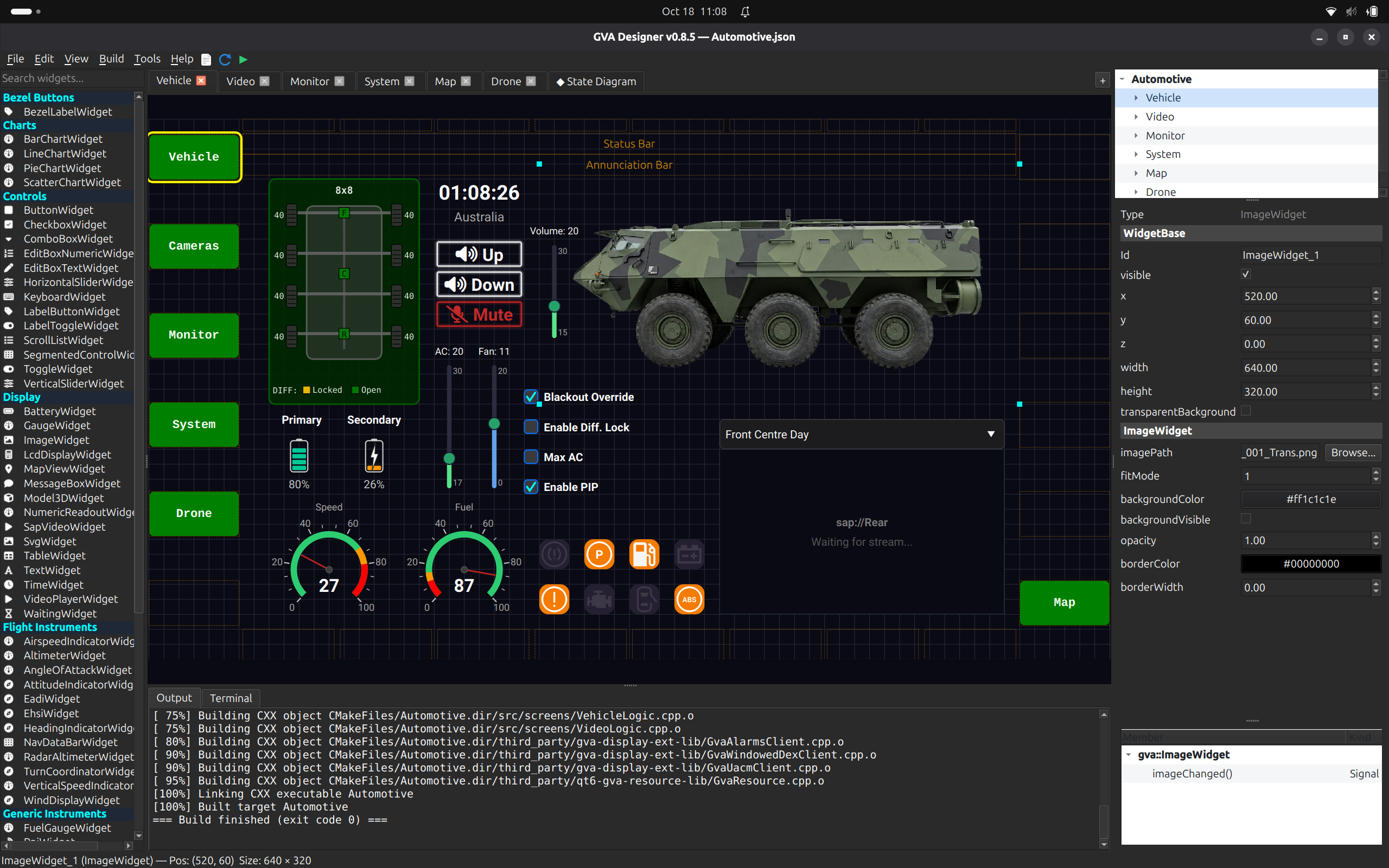
- Drag-and-drop canvas with grid snapping, corner resize handles and an exact-value Properties pane
- A palette of 62 widget types: controls, displays, gauges, instruments, maps, video, layout containers and more
- Layout containers (vertical box, horizontal box, grid) that manage nested widgets
- Scene Hierarchy panel to select, rename, hide and show widgets
- Cut, copy, paste and duplicate
- Multiple screens in one project, for example Main, Alarm and Shutdown
- Design guide overlay of the GVA HMI's function-key and area-button positions
- Fullscreen preview that shows the screen as the crew will see it
- Built-in help, with a generated reference page for every widget
Behaviour and navigation
- State Diagram that links screens with HMI function keys, with a configurable initial screen
- Claim F-keys from the HMI, label them, and receive their presses
- Optional pointer (mouse and touch) input for designed buttons
- A signal handler generated for every widget signal, ready to fill in, in logic files that are never overwritten
Illustrator and design-tool exchange
- Import SVG from Adobe Illustrator, Inkscape or Figma, stored inside the project
- Rig named SVG elements to rotate or translate with a value, to make live instruments
- Export layered SVG, per screen or all screens, at HD up to 8K, plus an animation sidecar for other runtimes
GVA platform integration
- Every generated application registers with the GVA registry before it publishes
- Draws under the GVA HMI as a Display Extension third party
- HMI Integration dialog that writes the registry and HMI configuration entries for you
- Alarms API: raise and lower alarm conditions from your own logic
- UACM API: report health, faults and monitored characteristics
- SAP video widget with a live preview and a list of the video streams on the network
Build and deploy
- Generate, compile and run from the menu
- Headless command-line generation and build, suited to automation and CI
- Output is a standalone, git-ready CMake project on the open LDM SDK
- Your project file is plain JSON that other applications can load
Why it matters
Open architecture is only useful if people can build on it. By pairing AstuteDDS and ATLAS with a visual designer, we are removing the gap between a good idea and a working application on a vehicle. SMEs can bring specialist capability without needing to become integrators. Primes and programme offices can move faster and keep their options open. And crews get updates when they need them, not when the next big release lands.
Get involved
This is the first time the world is seeing GVA Designer. If you would like a demonstration, want to talk about your own application, or want to be among the first to try it, get in touch with Astute Systems.