
Design it. Generate it. Deploy it.
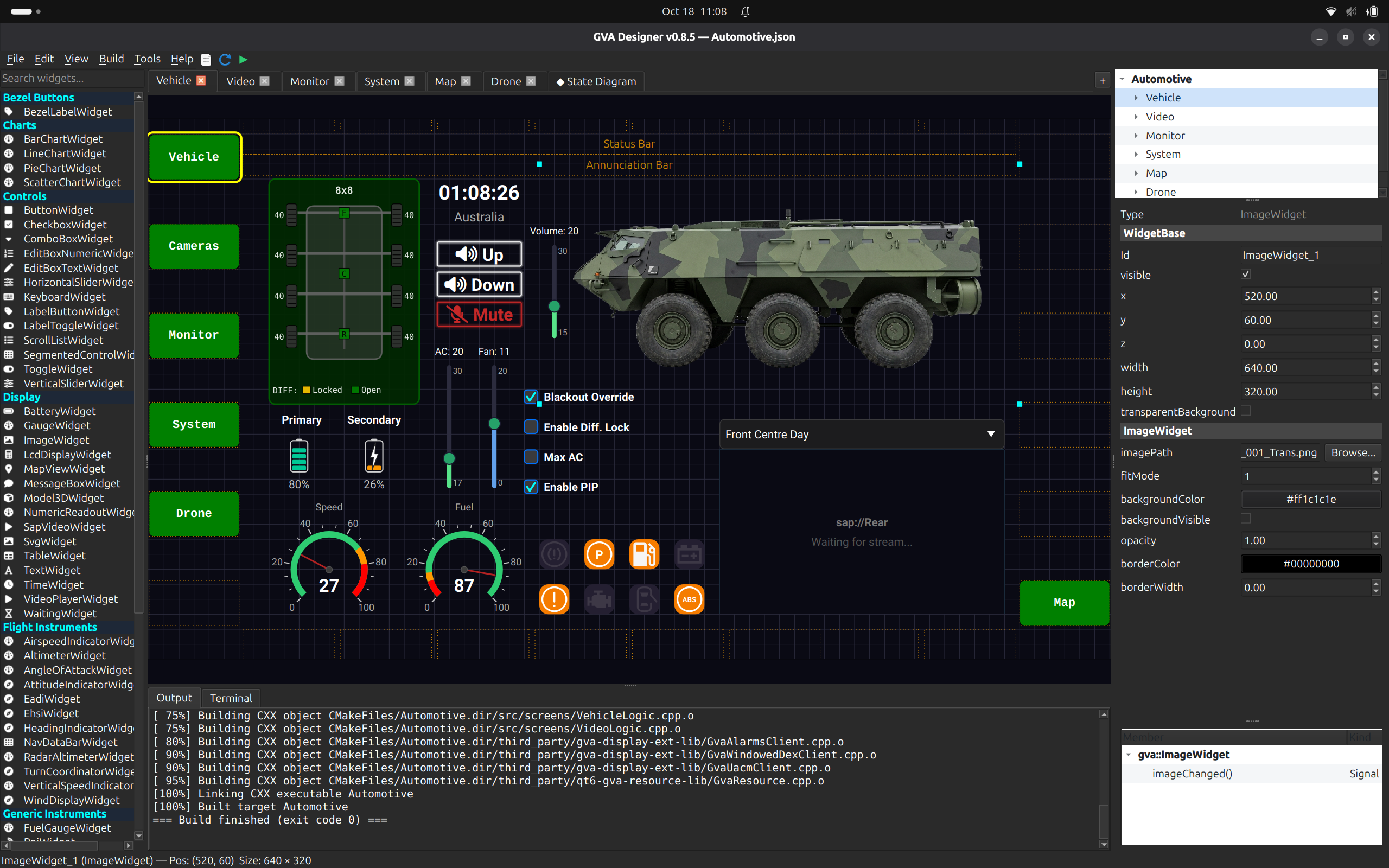
GVA Designer is a visual screen builder for Generic Vehicle Architecture (GVA) displays. Compose crew screens from real GVA widgets, link them to the HMI function keys, and generate a complete, registered application that runs on the vehicle's digital glass display.
Powered by Astute DDS and enabled by ATLAS Digital Crew.
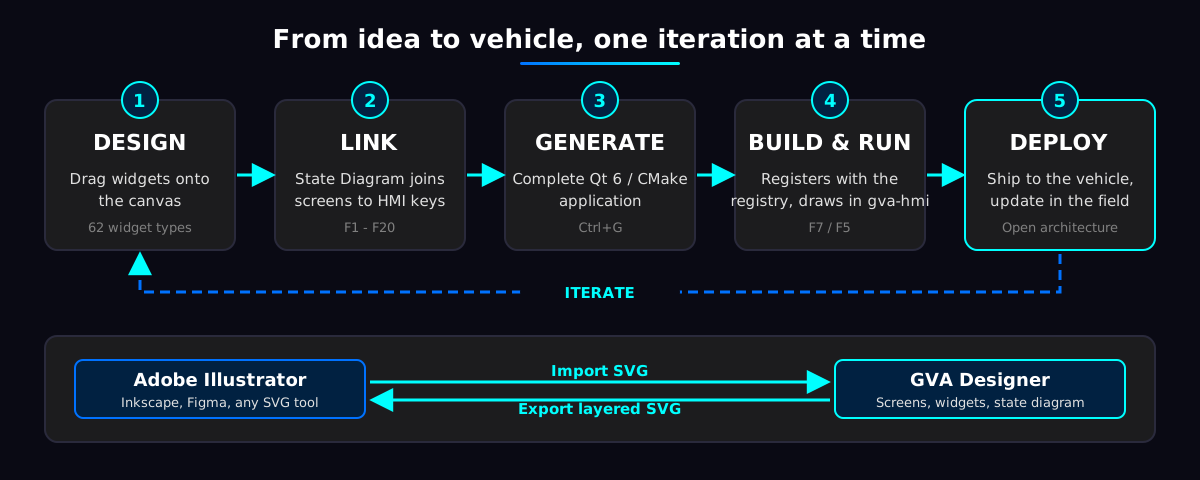
From Idea to Vehicle
Five steps, one iteration at a time. Design the screen, link it to the HMI keys, generate the application, build and run it, then deploy and update in the field.
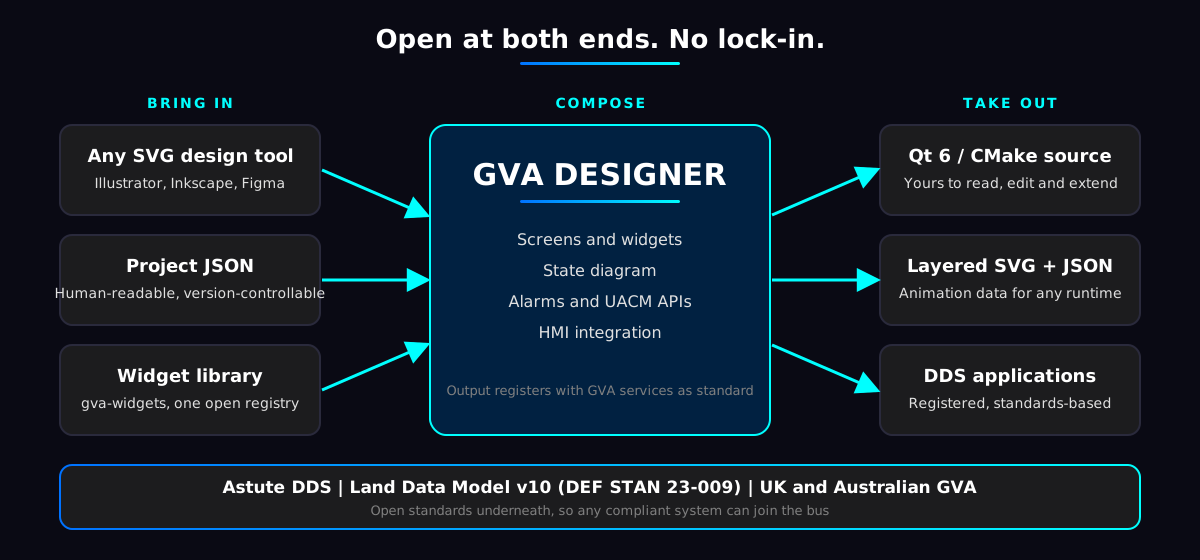
Open Architecture
Nothing about GVA Designer traps your programme. Artwork comes in from the design tools you already use, projects are plain JSON, and the generated application is standard Qt 6 and CMake source that is yours to read, extend and maintain.
Open formats
- SVG import from Illustrator, Inkscape and Figma
- Projects saved as readable JSON, ready for version control
- Layered SVG export with an animation sidecar for any runtime
Open source output
- Generated Qt 6 / CMake application, not a black box
- Hand-written logic survives every regeneration
- Build with your own toolchain and CI
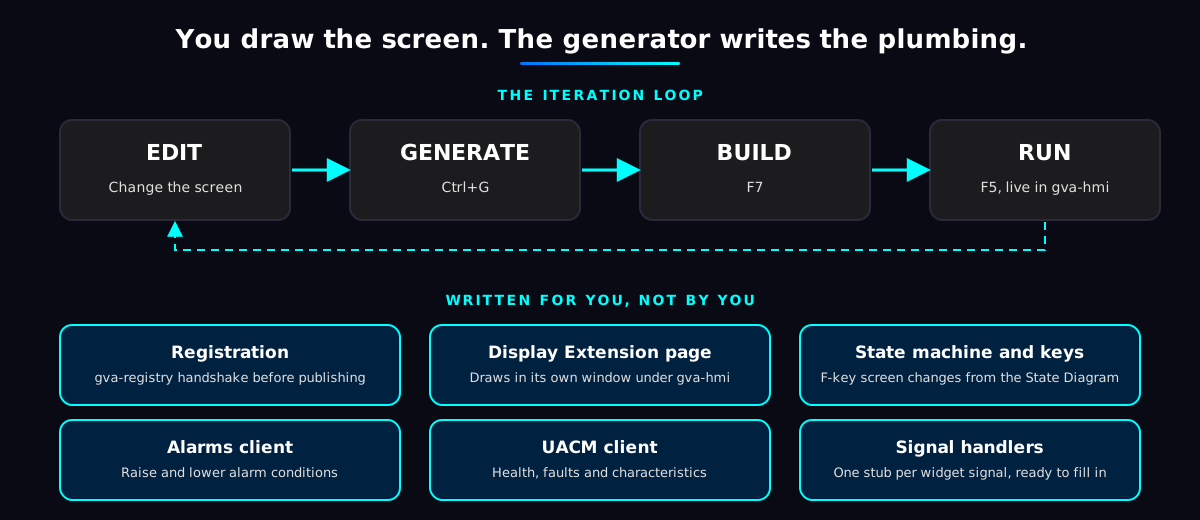
Rapid Deployment
The plumbing every GVA application needs is written for you. Registration, the Display Extension page, the state machine, and the Alarms and UACM clients are all generated, so a change to a screen is a short loop of edit, generate, build and run rather than a development task.
Features
| Feature | What it gives you |
|---|---|
| Drag-and-drop screen builder | Palette of every registered GVA widget (gauges, indicators, maps, video, buttons, layouts). Snap grid, resize handles and nested VBox / HBox / Grid layouts, on a live canvas of the real widgets |
| Multi-screen projects | One project holds many screens (Main, Alarm, Shutdown...), each with its own widget tree, canvas size and background |
| State Diagram | Join screens to HMI function keys visually. Screen changes are generated, not hand-coded |
| HMI bezel guide | Overlay of the gva-hmi label and function-key positions, so widgets are laid out around them |
| SVG import | Bring in artwork from Illustrator, Inkscape or Figma. The drawing is stored inside the project, so there are no loose image files to ship |
| Animated SVG widgets | Name the moving parts of a drawing (needles, bugs, horizons) and drive them from a live value: rotate or translate with clamp and wrap |
| SVG export | Layered SVG plus an animation JSON sidecar for design tools and other runtimes, from HD 720p to 8K UHD |
| Application generation | One command writes a complete Qt 6 / CMake application. Your own logic classes are never overwritten when you regenerate |
| Widget signal handlers | Every widget signal gets a ready-to-fill handler stub. Designed buttons respond to touch with no code at all |
| Automatic GVA registration | Generated applications register with gva-registry before they publish, as the standard requires |
| Display Extension integration | The generated application draws in its own window under gva-hmi and claims only the keys and pointer events it needs |
| HMI Integration wizard | Writes or merges the registry and HMI configuration entries that place your application on the HMI menu |
| Alarms API | Define alarm conditions in your screen logic, then raise and lower them. Acknowledgement stays an operator action on the HMI |
| UACM API | Report resource health, raise and clear faults, and publish monitored characteristics |
| Live video | SAP video widget plays H.264 streams with MediaX. Browse announced streams and preview them on the canvas while you design |
| Built-in help | Quick start, a reference page for every widget, shortcuts and Display Extension guidance, all inside the tool |
The Astute Stack
Powered by Astute DDS
Every generated application talks over Astute DDS, our DDS implementation built for GVA. Real-time, standards-based publish and subscribe means your screens share data with sensors, effectors and other applications without point-to-point wiring.
Enabled by ATLAS Digital Crew
GVA Designer produces the applications that run on ATLAS Digital Crew, the full GVA stack of HMI, registry, alarms and health monitoring. Design a screen once and it joins the crew's single, unified display.
Ready to build your crew display?
Tell us about your vehicle and your display. We will show you GVA Designer running against the full ATLAS stack.