ToolX
Discover. Stream. Manage. Zero-configuration video distribution for GVA platforms. DEF STAN 00-082 Compliant Video Streaming
The Challenge
Modern armored vehicles carry 20+ cameras — daylight, thermal, passenger — all streaming simultaneously over a shared Ethernet backbone. DEF STAN 00-082 demands that every display on the vehicle can discover and render any feed, automatically, with no manual setup.
ToolX makes that happen.
How It Works
Plug a camera into the vehicle network. ToolX announces it. Every display finds it. Video flows. That's it.
Three protocols work together seamlessly:
| Protocol | What It Does | |
|---|---|---|
| Discover | SAP | Cameras announce themselves on the network every few seconds |
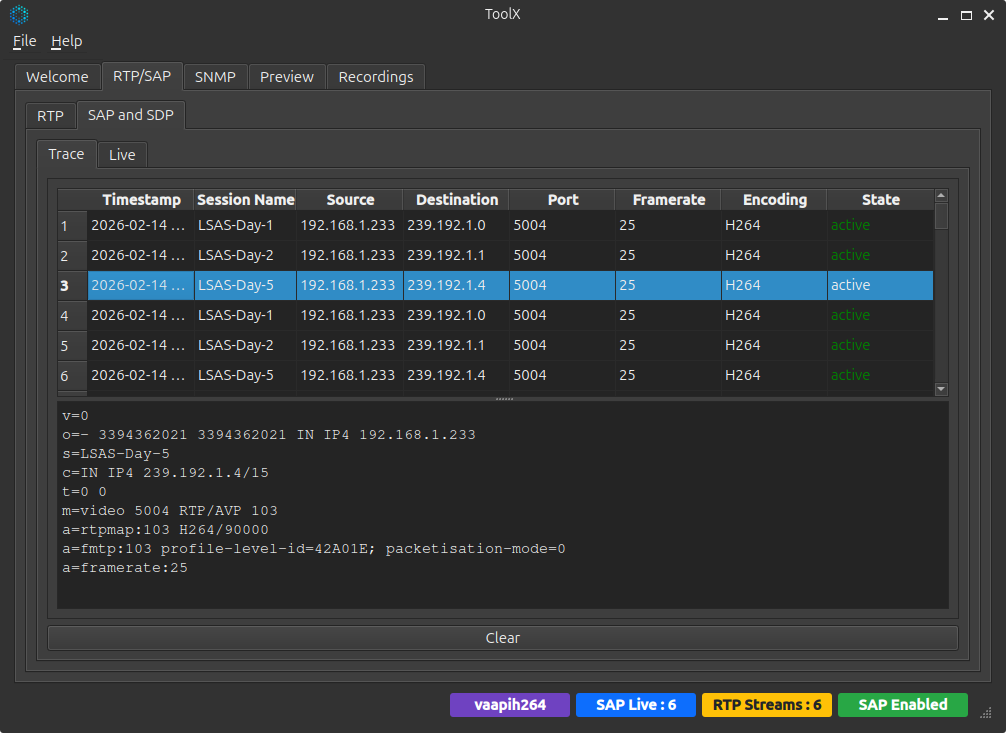
| Describe | SDP | Each announcement carries resolution, codec, and address details |
| Deliver | RTP | Video payload streams over efficient UDP multicast |
Key Features
Automatic Stream Discovery
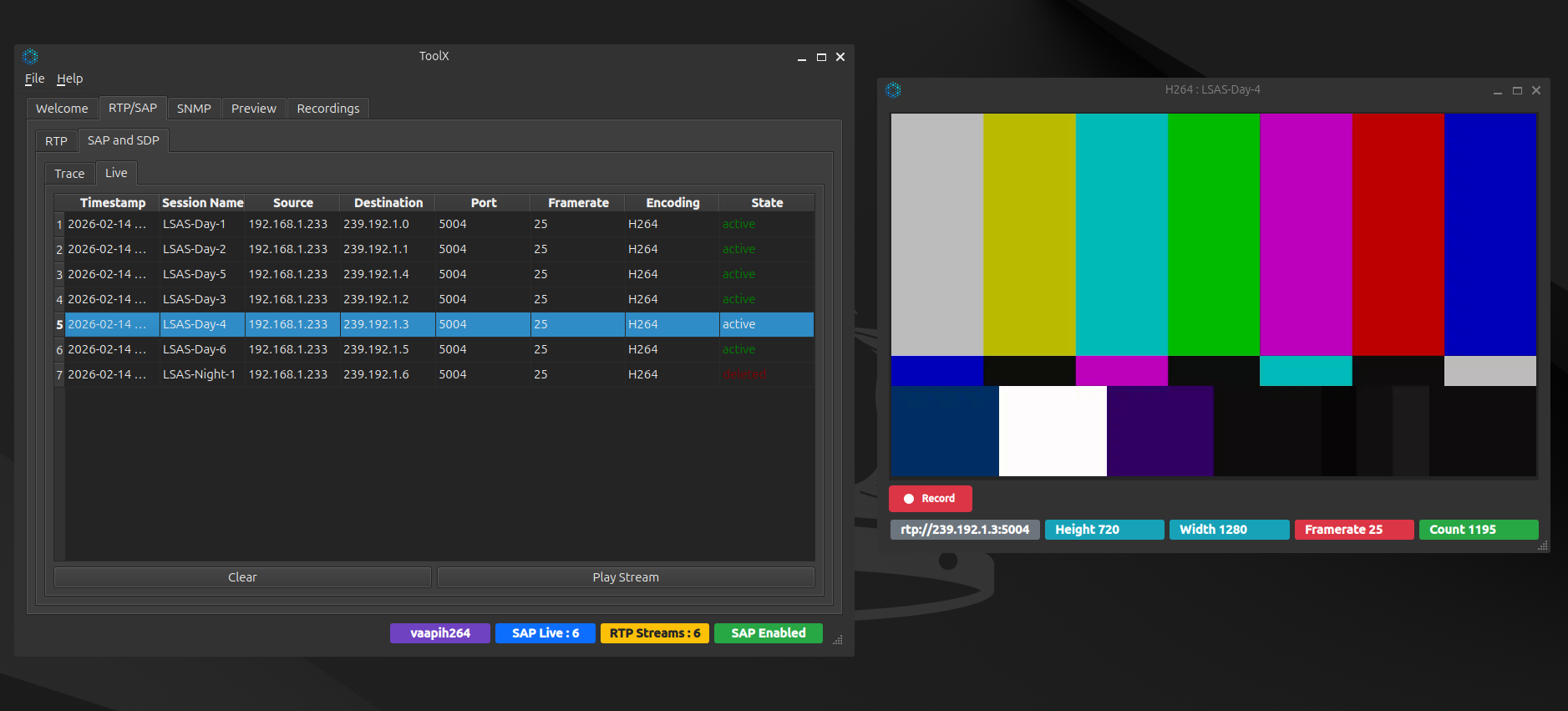
No IP addresses to configure. No spreadsheets to maintain. Cameras broadcast SAP announcements on the network, and ToolX builds a live inventory of every available feed — updated in real time.
- Streams appear within seconds of a camera coming online
- Stale feeds are automatically flagged when announcements stop
- Clean removal via SAP deletion when a camera is powered down
Wide Codec Support
From lossless uncompressed to bandwidth-efficient compressed — choose the right format for the mission.
| Format | Quality | Bandwidth | Best For |
|---|---|---|---|
| YCbCr 42 | Lossless | ~368 Mbps | Maximum fidelity, 10 GbE networks |
| RGB 24-bit | Lossless | ~553 Mbps | General purpose, full color depth |
| Mono 8 / 16-bit | Lossless | ~18 / 37 Mbps | Thermal imaging (TI) sensors |
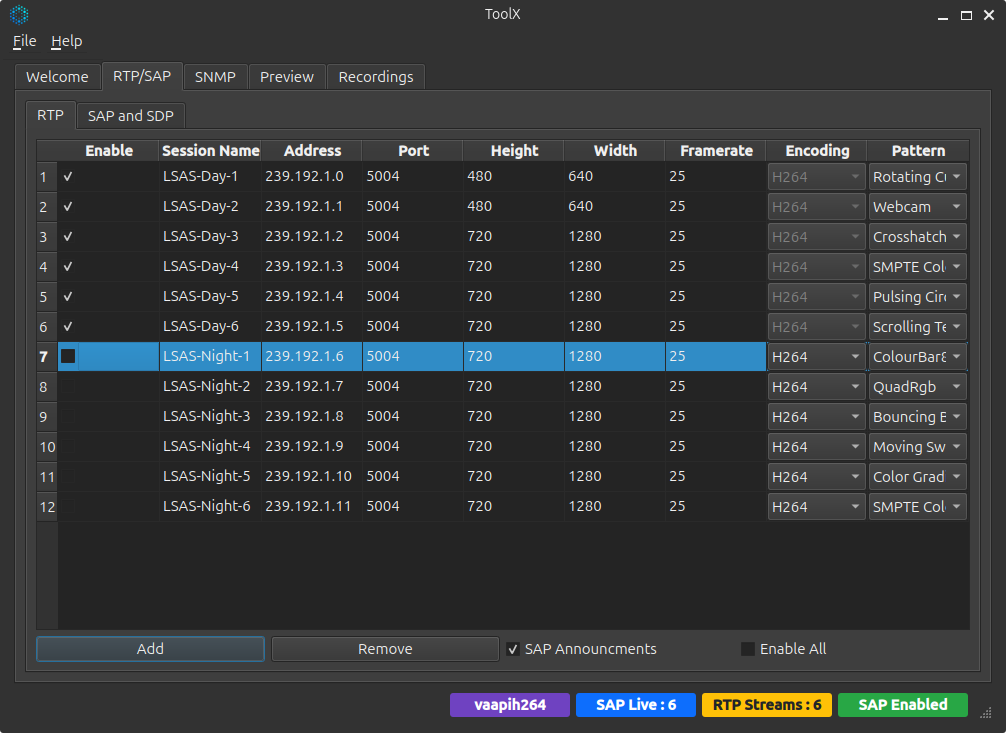
| H.264 | Near-lossless | ~2–8 Mbps | Standard 1 GbE networks, multi-camera |
| H.265 | Near-lossless | ~1–4 Mbps | Bandwidth-constrained links |
Hardware-Accelerated Encoding
Multiple encoder backends keep latency low and CPU usage minimal:
- VA-API — GPU hardware acceleration (default)
- OpenH264 — Portable software codec
- OpenMAX — Embedded platforms (Raspberry Pi, SBCs)
Built-In Device Management (VIVOE MIB)
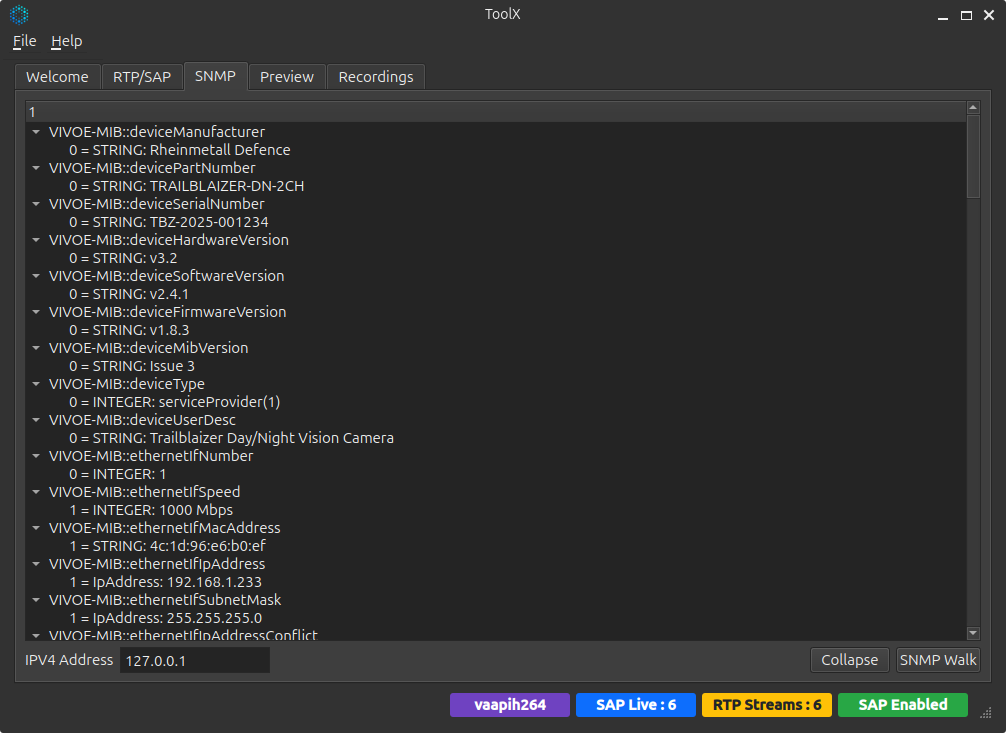
Every camera on a GVA network exposes a standard SNMP management interface defined by DEF STAN 00-082 Appendix A. ToolX includes a built-in SNMP browser to query any compliant device.
Manufacturer, serial, versions"] B["videoFormatTable
Resolution, codec, colourspace"] C["channelControl
Multicast IP, RTP config, SAP"] D["vivoeNotifications
Error & conflict traps"] end ROOT --> A ROOT --> B ROOT --> C ROOT --> D
DEF STAN 00-082 at a Glance
Everything ToolX does maps directly to the standard. Here's what compliance looks like:
| Requirement | Standard Says | ToolX Delivers |
|---|---|---|
| Stream transport | RTP over UDP multicast | All streams on 239.192.x.x:5004 |
| Uncompressed video | RFC 4175 mandatory | RGB24, YCbCr 42, Mono8, Mono16 |
| Stream discovery | SAP/SDP required | Automatic announce + live discovery table |
| Stream removal | SAP deletion required | Clean shutdown announcements |
| Device management | VIVOE MIB over SNMPv2c | Built-in SNMP walk & query |
| Camera naming | GVA designations | Standard DL / TI / PAX naming |
| Multi-stream | 20+ simultaneous feeds | Tested with full vehicle camera suites |
GVA Camera Designations
Cameras follow a standardized naming scheme so operators always know which view they're looking at:
| Code | Meaning | Example |
|---|---|---|
| DL | Daylight (visible spectrum) | Front Center DL |
| TI | Thermal Imaging (infrared) | Front Center TI |
| PAX | Passenger / interior | PAX Camera 1 |
Combined with position — Front, Rear, Left, Right, Center — every camera on the vehicle has a unique, human-readable identity.
Network Architecture
Stream Discovery"] RTP["RTP
Video Delivery"] SNMP["SNMPv2c
VIVOE MIB"] end subgraph "Transport" SAP --> UDP1["UDP 224.2.127.254:9875"] RTP --> UDP2["UDP 239.192.x.x:5004"] SNMP --> UDP3["UDP unicast :161"] end subgraph "Network" UDP1 --> MC["IPv4 Multicast"] UDP2 --> MC UDP3 --> UC["IPv4 Unicast"] end MC --> ETH["1 GbE / 10 GbE Ethernet"] UC --> ETH
Bandwidth Planning
Running multiple cameras? Here's what to expect at 1280×720 @ 25 fps:
| Codec | Per Stream | 11 Cameras | 20 Cameras |
|---|---|---|---|
| YCbCr 42 | 369 Mbps | 4.1 Gbps | 7.4 Gbps |
| H.264 | 2–8 Mbps | 22–88 Mbps | 40–160 Mbps |
| H.265 | 1–4 Mbps | 11–44 Mbps | 20–80 Mbps |
Bottom line: H.264 fits a full vehicle camera suite comfortably onto a standard 1 GbE backbone. Uncompressed requires 10 GbE but delivers zero-latency, pixel-perfect imagery.
Deployment Scenarios
H.264 720p 25fps"] end subgraph "Trailblaizer Pod" C2["2 Cameras
Day + Night
1080p H.264"] end subgraph "Pi Camera Array" C3["6 × Raspberry Pi
720p H.264"] end C1 --> N["GVA Ethernet Backbone"] C2 --> N C3 --> N N --> D1["Crew Station 1"] N --> D2["Crew Station 2"] N --> D3["Commander Display"] N --> TX["ToolX
Diagnostics &
Monitoring"]
Why ToolX
- Standards-first — Built from the ground up for DEF STAN 00-082 Issue 3
- Zero configuration — SAP/SDP auto-discovery means no manual stream setup
- Codec flexibility — Uncompressed for quality, H.264/H.265 for bandwidth, your choice
- Full diagnostics — Live SAP monitoring, stream playback, SNMP device inspection, recording
- Open architecture — Built on the MediaX open-source library
- Cross-platform — Linux-native with Qt6 GUI, headless CLI tools for embedded deployment