BMS Connectors
The BMS Application uses a modular connector architecture to integrate with various real-time data sources. Each connector implements a common interface for receiving position updates, video feeds, geofences, and bullseye references.
For creating new connector plugins, see the Extensions guide: Connector Extensions.
Connector Architecture
Cambridge Pixel"] TAK["📡 TAK Server
ATAK/WinTAK"] AI["🤖 AI Sensor
Autonomous Detection"] GPS["📍 GPS Receiver
NMEA 0183"] ADSB["✈️ ADS-B
OpenSky Network"] AIS["🚢 AIS
Marine Traffic"] GTFS["🚌 GTFS-RT
Transit Feeds"] JSON["📄 JSON Files
Static Data"] DDS["⚙️ DDS Bus
LDM v10"] end subgraph Connectors["BMS Connectors"] SPX["SPX Connector
UDP Multicast"] SAPIENT["SAPIENT Connector
TCP Protobuf"] COT["CoT Connector
TCP/Multicast"] NMEA["NMEA Connector
Serial/Network"] ADSBC["ADS-B Connector
REST API"] AISC["AIS Connector
WebSocket"] GTFSC["GTFS Connector
Protobuf"] JSONC["JSON Connector
File Watch"] LDMC["LDM Connector
DDS Topics"] end subgraph BMS["BMS Application"] CM["Connector Manager"] MAP["Map Widget"] TRACK["Track Display"] end %% RADAR feeds RADAR --> SPX RADAR --> SAPIENT %% AI Sensor feeds AI --> SAPIENT %% TAK feeds TAK --> COT %% Other feeds GPS --> NMEA ADSB --> ADSBC AIS --> AISC GTFS --> GTFSC JSON --> JSONC DDS --> LDMC %% Connectors to BMS SPX --> CM SAPIENT --> CM COT --> CM NMEA --> CM ADSBC --> CM AISC --> CM GTFSC --> CM JSONC --> CM LDMC --> CM CM --> MAP CM --> TRACK style RADAR fill:#e74c3c,color:#fff style AI fill:#9b59b6,color:#fff style TAK fill:#3498db,color:#fff style GPS fill:#27ae60,color:#fff style ADSB fill:#f39c12,color:#fff style AIS fill:#1abc9c,color:#fff style BMS fill:#2c3e50,color:#fff
Available Connectors
| Connector | Protocol | Transport | Description |
|---|---|---|---|
| SPX RADAR | Cambridge Pixel Binary | UDP Multicast | RADAR track reports from Cambridge Pixel systems |
| SAPIENT | BSI Flex 335 v2.0 | TCP Protobuf | Autonomous sensor integration (AI, RADAR) |
| CoT | Cursor on Target XML | TCP/Multicast | TAK ecosystem integration (ATAK, WinTAK) |
| NMEA | NMEA 0183 | Serial/TCP | GPS position data |
| ADS-B | OpenSky REST | HTTP/JSON | Real-time aircraft positions |
| AIS | AIS Messages | WebSocket | Maritime vessel tracking |
| GTFS | GTFS Realtime | HTTP/Protobuf | Public transit vehicle positions |
| JSON File | Custom JSON | File System | Static position data with live monitoring |
| LDM | Land Data Model v10 | DDS | GVA vehicle/unit positions |
SPX RADAR Connector
The SPX connector receives track reports from Cambridge Pixel RADAR systems over UDP multicast.
Protocol Details
- Magic Number:
0x4342(Cambridge Pixel) - Default Multicast:
239.192.50.79:5079 - Encoding: Big-endian binary
Message Types
| Type | Code | Size | Description |
|---|---|---|---|
| Tracker Status | 0x0115 |
80 bytes | Sensor position, track counts |
| Plot Status | 0x0116 |
48 bytes | Sector status updates |
| Track Minimal | 0x0110 |
72 bytes | Basic track info (ID, range, azimuth, speed) |
| Track Normal | 0x0111 |
128 bytes | Includes Cartesian position |
| Track Extended | 0x0112 |
Variable | Includes lat/lon from bitmap |
Track Status Values
| Status | Value | Symbol |
|---|---|---|
| Deleted | 0 | Track removed |
| Provisional | 1 | Pending confirmation |
| Established | 2 | Confirmed track |
| Lost | 3 | Coasting (no updates) |
| Plot | 4 | Raw detection |
Configuration
{
    "connectorId": "spx",
    "enabled": true,
    "settings": {
        "multicastAddress": "239.192.50.79",
        "port": 5079,
        "interface": "",
        "staleTimeoutSec": 30,
        "calculateLatLon": true
    }
}
SAPIENT Connector
The SAPIENT connector implements BSI Flex 335 v2.0 for autonomous sensor integration. It receives detection reports from AI sensors, RADAR, and LIDAR systems and converts them to map tracks with MIL-STD-2525D symbology.
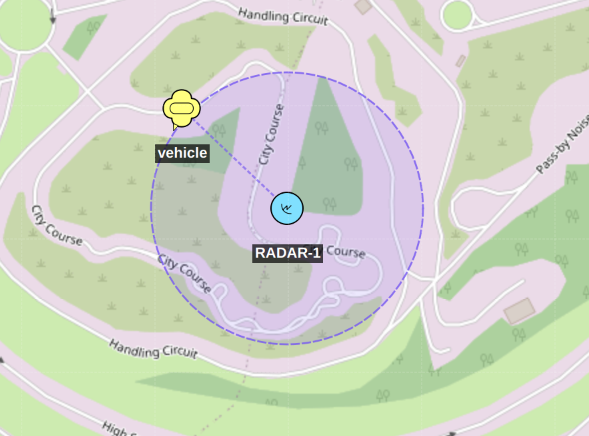
A SAPIENT sensor node (e.g. RADAR-1) publishes its own position/coverage, and separately reports each object it detects (e.g. a vehicle track) inside that coverage area. The BMS renders both: the sensor's own symbol plus a track symbol for every object the sensor is currently detecting.
Protocol Details
| Property | Value |
|---|---|
| Standard | BSI Flex 335 v2.0 (Dstl / Crown Copyright 2024) |
| Encoding | Protocol Buffers (sapient_msg.bsi_flex_335_v2_0) |
| Transport | TCP with 4-byte big-endian length prefix |
| Default port | 8080 |
Full protobuf parsing requires building with the SAPIENT proto files (HAS_SAPIENT_PROTO). Without them the connector operates in simplified parsing mode.
Operating Modes
| Mode | Description |
|---|---|
client |
Connects outward to a SAPIENT Data Fusion Node (DFN) |
server |
Binds and accepts inbound connections from autonomous sensor modules (ASMs) |
Message Types
| Message | Direction | Description |
|---|---|---|
Registration |
ASM → DFN/BMS | Sensor capabilities, ICD version, node type, mode definitions |
RegistrationAck |
DFN/BMS → ASM | Accept or reject registration with reason strings |
DetectionReport |
ASM → DFN/BMS | Object detections with position, classification, velocity |
StatusReport |
ASM → DFN/BMS | Sensor health (OK, WARNING, ERROR, GOODBYE), coverage, power |
Task |
DFN/BMS → ASM | Sensor tasking commands |
TaskAck |
ASM → DFN/BMS | Task acknowledgement |
Alert / AlertAck |
bidirectional | Alert events |
Sensor Move Tasking
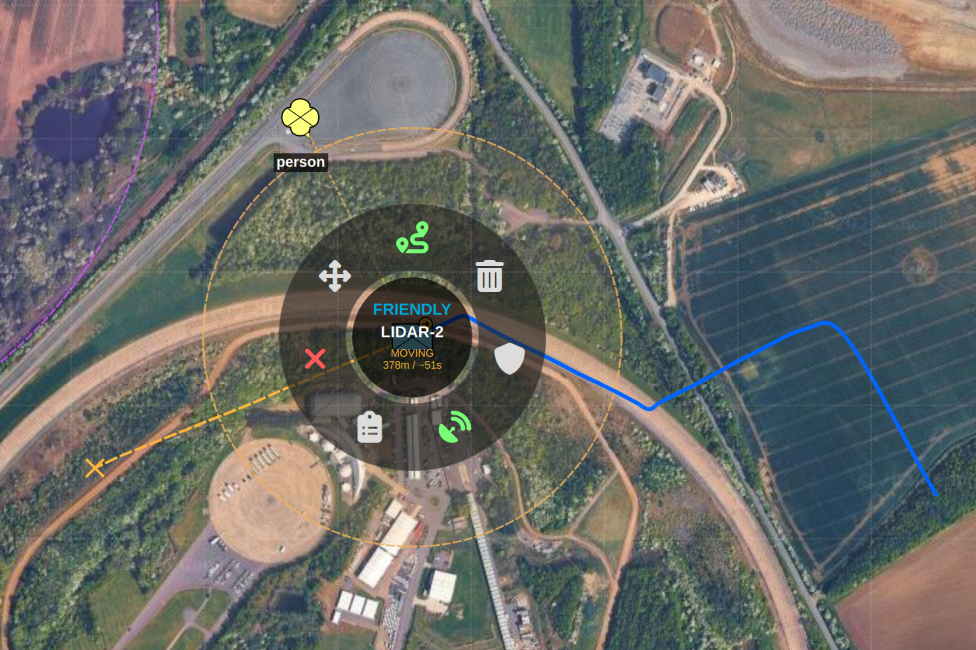
The BMS map's radial action menu can command a mobile SAPIENT sensor node to
move to a new location: selecting Move on a sensor's radial, then
clicking a destination on the map, sends a Task requesting the move and
draws a line to the picked destination. While the task is outstanding the
sensor's radial shows a live MOVING status with distance/ETA countdown
(derived from TaskAck and subsequent StatusReport/node_location
updates), and a Cancel Move action is added to the radial so the
operator can abort the in-progress move at any time.
Detection Reports
A DetectionReport carries:
object_id— ULID uniquely identifying the detected object across reportstask_id— ULID of the active taskstate— e.g."Active","Lost"- Location (one of):
Location— absolute WGS-84x(longitude),y(latitude),z(altitude) with coordinate system flag (LAT_LNG_DEG_M,LAT_LNG_RAD_M,UTM_M)RangeBearing— azimuth, elevation, range relative to the sensor node
ENUVelocity— east, north, up velocity in m/sdetection_confidence— 0–1 confidence the detection is realclassification— repeatedDetectionReportClassificationwith type strings and confidence levels
Detection Classifications
SAPIENT provides AI-based object classification. Classification strings are mapped to APP-6D SIDC:
| Classification | SIDC Battle Dimension | Notes |
|---|---|---|
| Vehicle | Ground (G) |
Tank, APC, truck, car |
| Person | Ground (G) |
Individual or group |
| Aircraft | Air (A) |
Fixed-wing or rotary |
| Maritime | Surface (S) |
Boat or ship |
| Unknown | Unknown (U) |
Fallback |
The APP-6D affiliation is derived from the connector's defaultAffiliation setting.
Node Types (Registration)
NodeType |
Description |
|---|---|
RADAR |
Radar-based system |
LIDAR |
Light-based ranging sensor |
CAMERA |
Optical / thermal camera |
ACOUSTIC |
Acoustic sensor |
SEISMIC |
Seismic sensor |
GPS_JAMMING |
GPS jamming detector |
COMMS_INTELLIGENCE |
COMINT sensor |
HUMAN |
Human reporter |
FUSION |
Data fusion node |
OTHER |
Unclassified type |
Stale Track Removal
Tracks not updated within staleTimeout seconds are automatically removed and a trackLost(objectId) signal is emitted. The stale check runs every 30 seconds.
Reconnection
In client mode, if the TCP connection is lost the connector schedules an automatic reconnect after reconnectInterval seconds (default 5 s). The reconnect cycle continues until stop() is called.
Configuration
{
    "connectorId": "sapient",
    "enabled": true,
    "settings": {
        "mode": "client",
        "host": "192.168.1.100",
        "port": 8080,
        "nodeId": "",
        "defaultAffiliation": "unknown",
        "staleTimeout": 300,
        "reconnectInterval": 5
    }
}
| Key | Type | Default | Description |
|---|---|---|---|
mode |
string | client |
client or server |
host |
string | 127.0.0.1 |
DFN host (client) or bind address (server) |
port |
integer | 8080 |
TCP port |
nodeId |
string | (auto-generated UUID) | Node UUID sent in Registration messages |
defaultAffiliation |
string | unknown |
Affiliation applied to all detections: unknown, pending, friend, neutral, hostile, suspect |
staleTimeout |
integer | 300 |
Seconds before an unseen track is removed |
reconnectInterval |
integer | 5 |
Seconds between reconnect attempts (client mode) |
Server Mode Example
{
    "connectorId": "sapient",
    "enabled": true,
    "settings": {
        "mode": "server",
        "host": "0.0.0.0",
        "port": 8080,
        "defaultAffiliation": "unknown",
        "staleTimeout": 300
    }
}
Cursor on Target (CoT) Connector
The CoT connector provides full integration with the TAK ecosystem (ATAK, WinTAK, TAK Server). It supports both receiving and transmitting SA (situational awareness) data, Self-SA broadcasting, mesh peer unicast, and authenticated TAK server connections.
Protocol Details
| Property | Value |
|---|---|
| Format | CoT XML (legacy) or TAK Protocol Buffer v2 (binary) |
| SA multicast group | 239.2.3.1:6969 |
| Default TCP port | 8087 (plain) / 8089 (TAK server streaming) |
| TAK Protocol magic byte | 0xBF |
Receive Modes (source)
| Mode | Description |
|---|---|
multicast |
Join UDP multicast group — receives all SA broadcasts on the local network |
tcp |
Connect to a single TCP host (e.g. a TAK server relay or ATAK device) |
takserver |
Authenticated connection to a TAK Server with protocol version negotiation and optional TLS |
TAK Server Connection
When source is takserver, the connector:
- Opens a TCP (or TLS) connection to
takServerHost:takServerPort. - Sends a protocol negotiation frame requesting CoT XML (
version=0) or TAK Protobuf v1 (version=1). - Receives the server's
<version>response and confirms the agreed version. - Enters
Authenticatedstate and begins receiving SA tracks.
Connection state transitions:
TLS / Certificate Support
For secure TAK server connections (tlsEnabled: true):
- PEM client certificate + private key (
clientCertPath/clientKeyPath) - CA certificate for server verification (
caCertPath) - PKCS#12 bundle (
.p12/.pfx) vialoadPkcs12Certificate()— requiresHAS_OPENSSL - Certificate password protected keys are supported (
keyPassword)
Transmit — Self-SA Broadcasting
When transmitEnabled is true, the connector periodically broadcasts the platform's own position as a CoT Situational Awareness event (a-f-G-U-C by default).
| Setting | Default | Description |
|---|---|---|
transmitEnabled |
false |
Enable Self-SA broadcast |
selfSaInterval |
3 s |
Broadcast interval |
txMulticastGroup |
same as receive | Multicast group to transmit on |
txMulticastPort |
same as receive | Port to transmit on |
transmitProtocol |
0 (XML) |
0 = CoT XML, 1 = TAK Protobuf v2 |
callsign |
GVA-BMS |
Own callsign |
uid |
(auto-generated) | Own UID (stable across restarts if set) |
team |
Cyan |
TAK team colour |
role |
Team Member |
TAK role |
cotType |
a-f-G-U-C |
Own CoT type string |
Mesh Peer Unicast
In addition to multicast, the connector can send CoT events directly to named peers:
"meshPeers": [
    { "address": "192.168.1.50", "port": 6969 },
    { "address": "192.168.1.51", "port": 6969 }
]
sendToAllPeers() transmits to every configured peer. Individual peers can be addressed with sendToPeer().
GeoChat
Incoming CoT events of type b-t-f (GeoChat) are parsed and emitted as chatMessageReceived(uid, senderCallsign, chatroom, message, timestamp) so the BMS chat widget can display them alongside positional tracks.
Track Filtering
| Setting | Description |
|---|---|
filterCotTypePrefix |
Only accept tracks whose CoT type starts with this string (e.g. "a-h" for hostile only). Empty = accept all. |
filterTeamColor |
Only accept tracks from the specified TAK team colour (e.g. "Red"). Empty = accept all. |
maxTracks |
Maximum concurrent tracks. Oldest entry is evicted when the limit is exceeded. 0 = unlimited. |
filterFriendly |
true = suppress friendly (a-f-*) tracks from the map. |
CoT Type → SIDC Mapping
| CoT Type Pattern | Affiliation | APP-6D Battle Dimension |
|---|---|---|
a-f-G-* |
Friendly | Ground |
a-f-A-* |
Friendly | Air |
a-f-S-* |
Friendly | Surface (maritime) |
a-h-G-* |
Hostile | Ground |
a-h-A-* |
Hostile | Air |
a-n-G-* |
Neutral | Ground |
a-s-G-* |
Suspect | Ground |
a-u-* |
Unknown | (any) |
a-p-* |
Pending | (any) |
b-m-p-* |
— | Map point / marker |
b-t-f |
— | GeoChat message |
Stale Track Removal
Tracks not updated within staleTimeout seconds (default 300 s) are removed. The stale check runs every 30 seconds.
Configuration Reference
{
    "connectorId": "cot",
    "enabled": true,
    "settings": {
        "source": "multicast",
        "multicastGroup": "239.2.3.1",
        "multicastPort": 6969,
        "networkInterface": "",
        "staleTimeout": 300,
        "filterFriendly": false,
        "filterCotTypePrefix": "",
        "filterTeamColor": "",
        "maxTracks": 0,

        "transmitEnabled": true,
        "selfSaInterval": 3,
        "transmitProtocol": 0,
        "callsign": "GVA-BMS",
        "team": "Cyan",
        "role": "Team Member",
        "cotType": "a-f-G-U-C"
    }
}
TAK Server (TCP / TLS) Example
{
    "connectorId": "cot",
    "enabled": true,
    "settings": {
        "source": "takserver",
        "takServerHost": "tak.example.mil",
        "takServerPort": 8089,
        "tlsEnabled": true,
        "clientCertPath": "/etc/tak/client.pem",
        "clientKeyPath": "/etc/tak/client.key",
        "caCertPath": "/etc/tak/ca.pem",
        "autoReconnect": true,
        "reconnectIntervalMs": 5000,
        "transmitEnabled": true,
        "callsign": "CALLSIGN-1"
    }
}
| Key | Type | Default | Description |
|---|---|---|---|
source |
string | multicast |
multicast, tcp, or takserver |
multicastGroup |
string | 239.2.3.1 |
Receive multicast group |
multicastPort |
integer | 6969 |
Receive multicast port |
tcpHost |
string | localhost |
Remote host for tcp mode |
tcpPort |
integer | 8087 |
Remote port for tcp mode |
takServerHost |
string | — | TAK server hostname/IP |
takServerPort |
integer | 8089 |
TAK server streaming port |
tlsEnabled |
bool | false |
Use TLS for TAK server |
clientCertPath |
string | — | PEM client certificate |
clientKeyPath |
string | — | PEM private key |
caCertPath |
string | — | CA certificate for server verification |
keyPassword |
string | — | Private key password (if encrypted) |
autoReconnect |
bool | true |
Reconnect on TAK server disconnect |
reconnectIntervalMs |
integer | 5000 |
Reconnect interval in ms |
networkInterface |
string | — | Bind interface for multicast (empty = default) |
filterFriendly |
bool | false |
Suppress friendly tracks |
filterCotTypePrefix |
string | — | Accept only tracks with this CoT type prefix |
filterTeamColor |
string | — | Accept only tracks from this TAK team |
maxTracks |
integer | 0 |
Max concurrent tracks (0 = unlimited) |
staleTimeout |
integer | 300 |
Seconds before a track is removed |
transmitEnabled |
bool | false |
Enable Self-SA broadcast |
selfSaInterval |
integer | 3 |
Self-SA interval in seconds |
txMulticastGroup |
string | (same as receive) | Transmit multicast group |
txMulticastPort |
integer | (same as receive) | Transmit multicast port |
transmitProtocol |
integer | 0 |
0 = XML, 1 = TAK Protobuf v2 |
callsign |
string | GVA-BMS |
Own callsign |
uid |
string | (auto-generated) | Own UID |
team |
string | Cyan |
TAK team colour |
role |
string | Team Member |
TAK role |
cotType |
string | a-f-G-U-C |
Own CoT type |
meshPeers |
array | [] |
Unicast mesh peers [{"address":"…","port":6969}] |
Data Flow
Connector Manager
The Connector Manager handles:
- Registration: Built-in and plugin connectors
- Lifecycle: Start, stop, configure connectors
- Routing: Forward updates to map and track displays
- Status: Monitor connector health and statistics
Loading Connectors
// Get connector manager instance
auto* manager = ConnectorManager::instance();

// Create and configure a connector
auto* spx = manager->createInstance("spx", "radar-1");
spx->configure({
    {"multicastAddress", "239.192.50.79"},
    {"port", 5079}
});

// Connect signals
connect(spx, &ConnectorInterface::positionUpdated,
        this, &BmsWindow::onPositionUpdate);

// Start receiving data
spx->start();
Symbol Mapping
Connectors convert source-specific data to APP-6D military symbols (SIDC):
| Source | Default Symbol | Notes |
|---|---|---|
| SPX Track | Air/Surface Unknown | Based on track status and flags |
| SAPIENT Detection | Based on classification | AI confidence affects display |
| CoT Event | Derived from CoT type | Direct mapping from a-X-Y-Z |
| ADS-B Aircraft | Neutral Air | Based on aircraft category |
| AIS Vessel | Neutral Surface | Based on vessel type |
Adding Custom Connectors
Implement the ConnectorInterface to create custom connectors:
class MyConnector : public ConnectorInterface
{
    Q_OBJECT
public:
    QString connectorId() const override { return "my-connector"; }
    QString displayName() const override { return "My Custom Connector"; }

    bool configure(const QVariantMap& settings) override;
    bool start() override;
    void stop() override;

    // Emit positionUpdated() when data arrives
};
See ConnectorInterface.h for the full interface definition.